Feedback, brightness and motion: the closed-form maths
A MilkDrop picture is built by a loop. Every frame the engine takes the previous frame, resamples it through the warp (zoom, rotate, stretch, shader), lets it fade, draws the waves and shapes on top, and then shows the result through the composite. What you see after five seconds is the loop's long-term behaviour, which no single drawing step explains.
The predictor works out that long-term behaviour from the source, in closed form where possible. The running example on this page is Various - Fire and Brimstone, a fluid, flame-like preset.
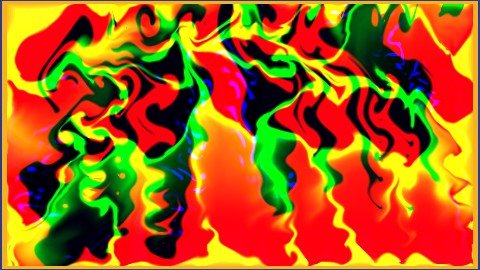
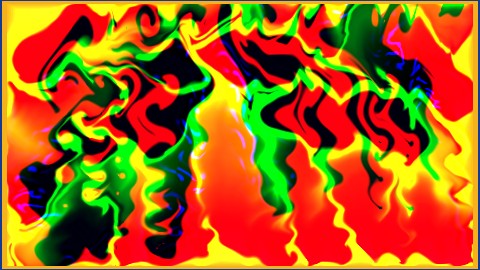
Left: the frozen prediction image. Right: the emulator render at the same moment (5 s). See Prediction images for how both are made.
1. How much of the previous frame survives
Plain decay and the 8-bit orbit
Without a custom warp shader, each frame is multiplied by the decay setting (often 0.95 to 1.0). The engine stores the canvas as 8 bits per channel, so the fade is not smooth: a stored level k/255 becomes round(k·decay)/255 each frame. That rounding creates an orbit in which bright levels fall quickly and dim levels can get stuck. With decay 0.98, for example, any level at or below 24/255 never changes, because round(24·0.98) = round(23.52) = 24. Dim trails then persist forever as a faint residue.
The analyzer computes this orbit exactly for each preset (feedback_persistence): how many frames it takes to halve a level, where levels stop decaying (the floor), and whether a faint permanent residue builds up.
The warp transfer
With a custom warp shader, projectM ignores decay, and the shader's output is the next frame. The analyzer therefore evaluates the exported warp program on flat colours. It feeds the shader a uniform canvas at 11 levels (0, 1/255 … 32/255, 0.25, 0.5, 0.75, 1) at three times (2, 5 and 8 s) and reads what comes out. For uniform content this gives, per channel:
- a gain, the fraction that survives each frame;
- an offset, added regardless of the input;
- whether the response is linear, and if not, how much is retained at each level;
- the halving time in frames and the steady level the channel settles at.
For Fire and Brimstone the warp transfer reads:
| Channel | Gain per frame | Linear | Halving | Steady level from full |
|---|---|---|---|---|
| Red | 0.994 | yes | none (barely fades) | 1.0 |
| Green | 0.970 | no | none | 1.0 |
| Blue | 0.850 | yes | 4.3 frames | 0.053 |
Red and green are kept almost whole and blue is cut hard, so whatever is drawn drifts towards red plus green: yellow, orange and amber. This table alone explains why the preset looks like fire. The analyzer flags it as channel_selective and describes each channel separately instead of averaging them.
Some warps take a modulo (frac) instead of fading, so levels step up every frame and wrap around. The transfer records this as wrap, with a shift per frame and a cycle length, and the preset is described as continuously colour-cycling instead of leaving trails.
2. Where the canvas settles: feedback equilibrium
If every frame keeps a fraction g of the canvas and drawn elements add colour c with alpha a, the canvas converges to a fixed point:
- additive drawing:
x* = a·c / (1 − g) - alpha-blended drawing:
x* = a·c / (1 − (1 − a)·g)
feedback_equilibrium.py applies this per channel to every drawn element: shapes (using their area-averaged radial gradient), waves, borders and motion vectors. Element colours written as formulas use their average over 0.25 to 10 s and over all instances (bands held at 1). rand calls use the expected value of projectm-eval's uniform draws.
For Fire and Brimstone the steady state is RGB (0.96, 0.97, 0.08), which is yellow, as the transfer table suggested.
Local and spread estimates
A drawn element covers only part of the screen, so the equilibrium is computed two ways. The local estimate is the colour where an element keeps drawing. The spread estimate is the same energy smeared over the whole screen by the warp. Real presets sit between the two.
The canvas fixed point with alpha-over mixing
The latest refinement (_canvas_fixed_point) iterates a three-number recurrence for the canvas level per channel over 300 steps. It mixes new paint over the decayed canvas with proper alpha-over compositing and uses the measured warp transfer instead of a single gain. It averages steps 60 to 299, the same window the engine ruler measures. On 1,000 randomly chosen presets, its rank correlation with the real brightness rose from 0.364 to 0.378.
Trails pass through bright levels
With a nonlinear composite, the displayed brightness is the average of the composite over the canvas levels, which is different from the composite of the average level. A preset whose average canvas level maps to black can still look bright, because on their way down its trails pass through levels that the composite maps to white.
_trail_histogram derives that level distribution. Paint of area a per frame at level L leaves levels bg + (L − bg)·g^k, each covering area a, until the screen is covered. The composite is then averaged over that distribution (display_trail_luma). The effect was found by comparing static estimates with frame-by-frame previews (see the journal). On 120 previously missed presets, this raised rank correlation with real brightness from 0.25 to 0.34.
3. How the canvas is shown: the composite
The composite shader is evaluated the same way as the warp:
- The flat transfer runs the exported composite program on flat canvas colours at 11 levels and 3 times. It gives the displayed colour for each canvas level and whether that mapping changes over time (
time_varying). - The colour matrix comes from four evaluations (black, and pure red, green and blue at level 0.3) and gives how each canvas channel contributes to each displayed channel. A composite that swaps or mixes channels shows up here.
- The detail response is one evaluation on a grey multi-scale noise texture (480×270, level 0.5). It shows whether the composite colours, brightens or flattens texture.
- The legacy controls (gamma, brighten, darken, solarize, invert and video echo) are applied in the engine's order.
4. Pattern growth and detail
In many presets the warp shader does more than fade: it sharpens, grows or advects detail (reaction-diffusion, embossing, fluid flow). Two probes measure this statically:
- Detail gain (
warp_detail_gain) evaluates the warp once on dim grey noise (level 0.1, amplitude 0.02, 96×54). A gain above 1 means small structure grows each frame instead of fading. - Detail response (
warp_detail_response) runs the warp on grey multi-scale noise and measures the brightness, saturation and colour it produces from texture.
For Fire and Brimstone the detail gain is 1.08. The growing structure is the flame-like turbulence in the render.
5. Motion
The warp moves content through the warp map. For each mesh vertex the source point is
source = 0.5 + (p − 0.5) / zoom^(zoomexp^(2·rad − 1)), then stretched by sx, sy, rotated by rot about (cx, cy), minus the translation (dx, dy).
To get the per-frame values of these controls, the analyzer steps the exported per-frame program as numbers (bands held at 1) for up to 240 frames. A fixed work budget makes every machine stop at the same point. Per-pixel terms are evaluated at the 48×32 mesh vertices. From these values the analyzer derives:
- zoom flow in percent per frame (Fire and Brimstone contracts toward the centre by about 0.15% per frame);
- rotation flow in radians per frame (0.002);
- drift in pixels per second, and stretch;
- radial streaks, where a strong one-way zoom smears drawn detail along rays;
- ray sampling, where the warp reads one source point per ray, so every frame becomes rays converging on a centre.
Shader advection adds motion the mesh does not show. Sample offsets in the warp shader (up to about 0.06 to 0.08 of the screen for Fire and Brimstone) move content by the image's own gradients.
6. Flashing
Brightness jumps, where the whole screen gets much brighter or darker within a frame, come from a small number of mechanisms that the analyzer looks for:
- per-frame code that switches colours, alpha or decay on an audio threshold (
if (bass > 1.3) …), beat detection or a frame counter; - random redraws (
rand) of values that control brightness; - strobing borders, solarize or invert toggles, and video echo;
rand_frameterms in shaders that change every frame.
Each becomes a fact that records its trigger and the brightness change it can cause. The jumps estimate and the No strobe classifier on the mood page are built on these facts.
7. Why closed forms are not the end
Each mechanism above can be computed exactly for its own part of the loop. Real presets combine a dozen of them, with audio, randomness and drawn content interacting. A closed form for the brightness of the whole picture would have to solve the loop, and solving the loop is what rendering does.
The predictor therefore stops at facts and partial solutions: transfer tables, equilibria, trail distributions, detail gains, motion fields and flash sites. These become thousands of numerical features. A calibration model then learns, out of fold, how these features relate to what the engine actually shows, so the final estimate is still a function of the source alone.
When a preset is predicted badly, the fix goes into the facts rather than the model. The work is to find the missing mechanism (a composite applied to the wrong level distribution, a warp that magnifies area, a channel the transfer averaged away), fix it for every preset, and check the whole corpus for regressions. The journal records many of these corrections.