Preset moods
Moods are predictions
Every mood is predicted from the preset's source code, without rendering the preset. An option is only given where the analysis is confident, so some presets deliberately carry no option in a group. If a preset feels wrong for its mood, please report it. The predictions improve through reports on unlabelled and mislabelled presets.
The Mood panel lets you choose what kind of presets play: calm or busy, dark or bright, which colours, how much movement, which visual style, and whether to avoid flashing. You can combine options freely, and the panel always shows how many presets your choice leaves.
ProjectM TV decides these moods by reading each preset's equations, shaders, shapes and waves and working out mathematically what the picture will look like. The Predictor section describes the method and its accuracy in detail, with predictions next to real renders.
Open the Mood panel
Open the settings panel and choose Preset mood (Settings › Preset mood).
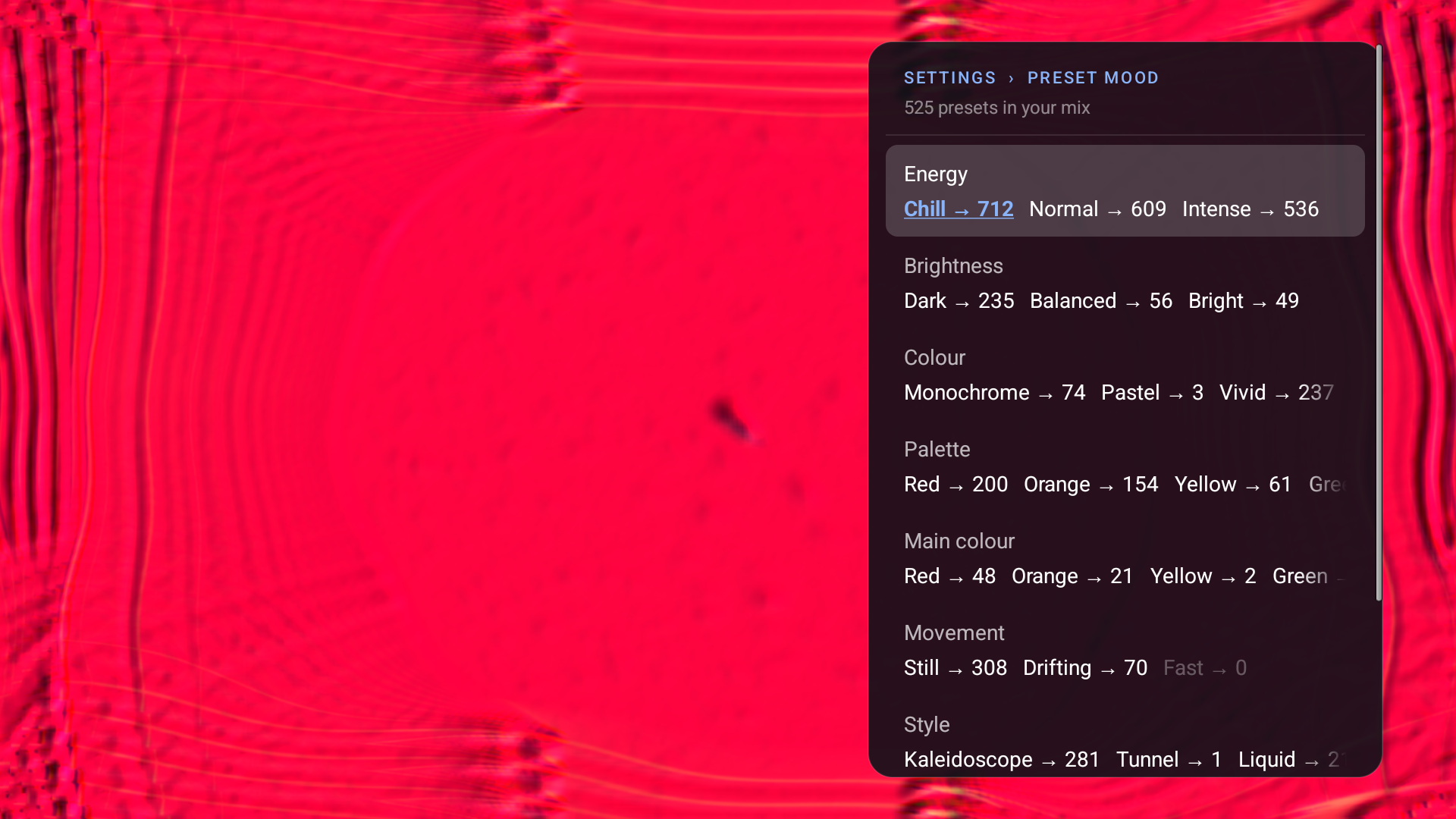
The Mood panel with Chill and No strobe selected: 525 presets. Each row scrolls sideways to its remaining options; Style and Comfort are further down.
Each row is one group of options. Up and Down move between rows, Left and Right move between options, and Center switches the focused option on or off. Every option shows the number of presets you would have if you toggled it (→ N; for a selected option, the mix without it). Clear all at the bottom switches everything off again. Back returns to the main panel.
The groups
| Group | Options | Meaning |
|---|---|---|
| Energy | Chill, Normal, Intense | How much the picture changes from frame to frame, how fast it moves and how often its overall brightness jumps, combined into one activity level. Chill presets drift and breathe; Intense presets churn, cut and pulse |
| Brightness | Dark, Balanced, Bright | The expected average brightness of the picture once the preset has settled |
| Colour | Monochrome, Pastel, Vivid, Warm, Cool | The colour character: grey or near-grey (Monochrome), soft and light (Pastel), strongly saturated (Vivid), leaning to red/orange/yellow (Warm) or to blue/cyan/purple (Cool) |
| Palette | Red, Orange, Yellow, Green, Cyan, Blue, Purple, Pink | Every colour family that makes up at least 10% of the preset's predicted colours. Most presets have two to five |
| Main colour | Red, Orange, Yellow, Green, Cyan, Blue, Purple, Pink | One colour, only when it clearly dominates the whole picture. Most presets have none |
| Movement | Still, Drifting, Fast | How fast the picture moves across the screen |
| Style | Kaleidoscope, Tunnel, Liquid, Geometric, Particles, Fractal | The construction read from the preset's equations and shapes: mirrored folds, zooming tunnels, fluid smearing, polygons, point clouds, self-similar maps |
| Comfort | No strobe | Presets the analysis expects not to flash. Admission is deliberately strict |
A preset can carry several options in one group (for example both Chill and Normal, several Style options, several Palette colours) or none. Grey presets (Monochrome) never carry a Palette or Main colour option.
Palette or Main colour?
The two colour groups select differently:
- Palette › Blue plays every preset in which blue is one of the colours, even if it shares the screen with pink and green.
- Main colour › Blue plays only presets that are mostly blue.
Choose Palette when you want a colour to be present, and Main colour when you want the whole screen in that colour. A main colour requires the picture to be dominated by one family, so Main colour pools are much smaller than Palette pools.
Presets per option
Counts are for the 9,606 bundled presets. Ranges overlap, so the counts in a group can add up to more or less than 9,606.
| Group | Option | Presets |
|---|---|---|
| Energy | Chill | 2,068 |
| Energy | Normal | 2,072 |
| Energy | Intense | 2,828 |
| Brightness | Dark | 1,780 |
| Brightness | Balanced | 1,236 |
| Brightness | Bright | 2,469 |
| Colour | Monochrome | 473 |
| Colour | Pastel | 318 |
| Colour | Vivid | 4,663 |
| Colour | Warm | 1,888 |
| Colour | Cool | 1,271 |
| Palette | Red | 4,342 |
| Palette | Orange | 2,786 |
| Palette | Yellow | 2,144 |
| Palette | Green | 6,286 |
| Palette | Cyan | 1,646 |
| Palette | Blue | 6,873 |
| Palette | Purple | 1,029 |
| Palette | Pink | 4,448 |
| Main colour | Red | 250 |
| Main colour | Orange | 235 |
| Main colour | Yellow | 36 |
| Main colour | Green | 97 |
| Main colour | Cyan | 38 |
| Main colour | Blue | 412 |
| Main colour | Purple | 21 |
| Main colour | Pink | 46 |
| Movement | Still | 1,276 |
| Movement | Drifting | 1,711 |
| Movement | Fast | 1,936 |
| Style | Kaleidoscope | 4,503 |
| Style | Tunnel | 700 |
| Style | Liquid | 4,132 |
| Style | Geometric | 2,032 |
| Style | Particles | 3,209 |
| Style | Fractal | 130 |
| Comfort | No strobe | 712 |
9,133 presets carry at least one Palette colour and 1,135 a Main colour.
How choices combine
- Options in the same group combine as OR: Palette › Red and Palette › Blue play presets with either colour.
- Options in different groups combine as AND: Chill and Dark play presets that are both.
- With nothing selected, all presets play, including those without any mood option. Clear all returns to that state. It rests while Custom plays, so your options are kept.
- Options that would leave no presets are dimmed, and Left and Right skip them.
- The header always shows a count: N presets in your mix, all available presets when nothing is selected, or Custom pack: N presets while Custom plays. Under 20 it adds few presets: some repetition. If no preset is left, because every match is skipped on this TV or a deselection leaves no preset that fits every group, it shows No presets match your mix; playing All and plays All.
- Counts exclude presets this TV has skipped. Automatic changes, Random and Previous stay inside the mix, and your choice is saved.
- A Chill, Normal or Intense choice saved by an earlier version becomes the matching Energy option.
- Presets from a custom pack have no attributes, so they do not play while any option is active. The Collection row (Built-in or Custom) appears when a pack exists or Custom is chosen; choose Custom to play the pack.
Presets without an option
The analysis only gives an option when it is confident. A preset whose brightness could be either Dark or Balanced gets neither. This keeps the options precise at the cost of smaller pools: an option you select plays presets that very likely belong there, but not every preset that would.
Unlabelled presets are not hidden. They play whenever the group they lack has nothing selected, and always when nothing is selected at all. Of the 9,606 bundled presets, 428 have no Energy, Brightness, Colour, Movement or Comfort option at all (they can still have Palette colours and Style). They are deliberately left that way so that people can report what they actually look like.
Which presets have attributes
GitHub editions bundle attributes for all 9,606 presets. F-Droid editions start with 20 starter presets that carry their own attributes, so the counts are small until you download the full collection from Advanced › Cream of the Crop (collection setup). A full-collection download made before attributes existed has none, and one made before the static moods (without Palette and Main colour) carries moods from an earlier definition. In both cases the Mood header reads Download the full collection again to choose moods (Settings › Advanced › Cream of the Crop), and only the Collection choice is offered until you download the current collection. Downloading, replacing or removing the collection updates the Mood panel and the mix immediately, without a restart.
How accurate are moods?
The predictions were checked out of fold against real renders of presets: the analysis was always scored on presets it had not been tuned on.
- About 4 of 5 options it gives are correct, and it gives about 2 of every 5 options a render would show.
- In-between options (Balanced, Drifting, Normal) are only given where they reach 80% precision in those checks, and Pastel where it reaches 70%.
- Palette finds about three quarters of the colours a render shows, and about 7 of 10 colours it names are present.
- Main colour names the render's top colour about 84% of the time.
The accuracy page has the numbers per option and explains how they were measured.
Report a wrong mood
Open an issue on GitHub with:
- the preset name (shown at the top of the settings panel);
- the option that is wrong or missing (for example "tagged Chill but strobes", "no Brightness option but clearly Dark", "Palette says blue, I see orange");
- the song or kind of music, and your TV model.
Reports on presets without an option are as useful as reports on wrong ones.
Limits
- Moods are predictions and do not measure your screen. A preset can look different with your music, especially where it reacts strongly to audio, uses random textures or picks random colours at load.
- No strobe and Chill are not guarantees against flashing. If you are sensitive to flashing light, use them only as a starting point.
- Style rests on source structure and is the least certain group.
- Some presets have no option in a group; they play only while that group has nothing selected.
- Custom-pack presets are excluded while any option is active.
Where moods come from
- How ProjectM TV understands presets: the idea, the rules and what ships.
- Reading a preset: from
.milktext to facts. - Feedback, brightness and motion: the closed-form maths.
- Colour and palettes: hue families, Palette and Main colour.
- From estimates to moods: calibration, precision floors and the shipped table.
- Accuracy, prediction images, predictions vs renders, the SDK and the research journal.